
Get Work
Redesigned a national work queue used by 450k+ people. Researched, strategized, shipped.
Get Work

Rebuilding Trust
in a Critical Work Queue
for 450k+ Users
Project Overview
Role: Lead UX Designer
Team: 5 UX Designers, 10 Developers,
2 Product Managers, 20 SMEs
Platform: Nationwide Accounting Platform
Contribution: Research, Strategy,
UX, UI, Analytics
Details adapted for confidentiality while preserving integrity.

The Challenge
Context: The Get Work feature is the main entry point for thousands of users across the country. It’s how they pull and access their daily tasks.
The Problem: Analysis of ServiceNow support tickets showed that approximately 12% of tasks pulled through the system were unworkable. Users had to return them to the queue. That created duplicate work and reduced trust in the platform.
Key Issues:
Rigid filters excluded user groups — The filtering system was built for a narrow set of workflows. Users with specialized roles had to navigate rigid dropdowns with dependent selections before seeing results
Data inconsistency reduced confidence — Users couldn’t trust the tasks they pulled. This led to hesitation, rework, and workarounds.
The system couldn't scale with the business — As the business grew, adding new filters became increasingly difficult to manage.
The Solution
We replaced rigid cascading dropdowns with a dynamic 3-tier filter panel, added a task type filter, standardized data labeling for clarity and consistency, and introduced chip filtering for faster, cleaner selections. Building a system that finally worked for every user workflow, not just some.

From rigid cascading dropdowns to a dynamic, role-aware filtering system
Research & Discovery
To understand the full scope of the problem, we conducted research across user behavior, expert knowledge, and system architecture.
User Pain Points Investigation:
ServiceNow ticket analysis revealed patterns in filter issues and filter requests. This gave us solid quantitative data.
Contextual inquiry sessions showed the effort users went through to pull work. Many had built workarounds to compensate for the rigid dropdown structure and were double-checking whether the work they pulled was accurate.
SME interviews across product lines uncover significant workflow differences. The existing system assumed uniform processes, but in reality, responsibilities and skill sets varied widely.
“
"This filter doesn't fit my work. I have to go through all the dropdowns just to scroll to the bottom and find out there's nothing there for me."
"I always cross-reference the dashboard to make sure the numbers are actually right."
— Participant feedback, contextual inquiry sessions.
Key Insight: The rigid filtering structure didn’t reflect how different users actually worked. The one-size-fits-all approach was failing to support diverse users across the nationwide platform.
Backend Investigation: A deeper look at the data architecture revealed why users couldn’t trust their results. Inconsistent labeling and fragmented database relationships meant filtered results were unreliable at the source. What appeared to be frontend issues were rooted in backend complexity.
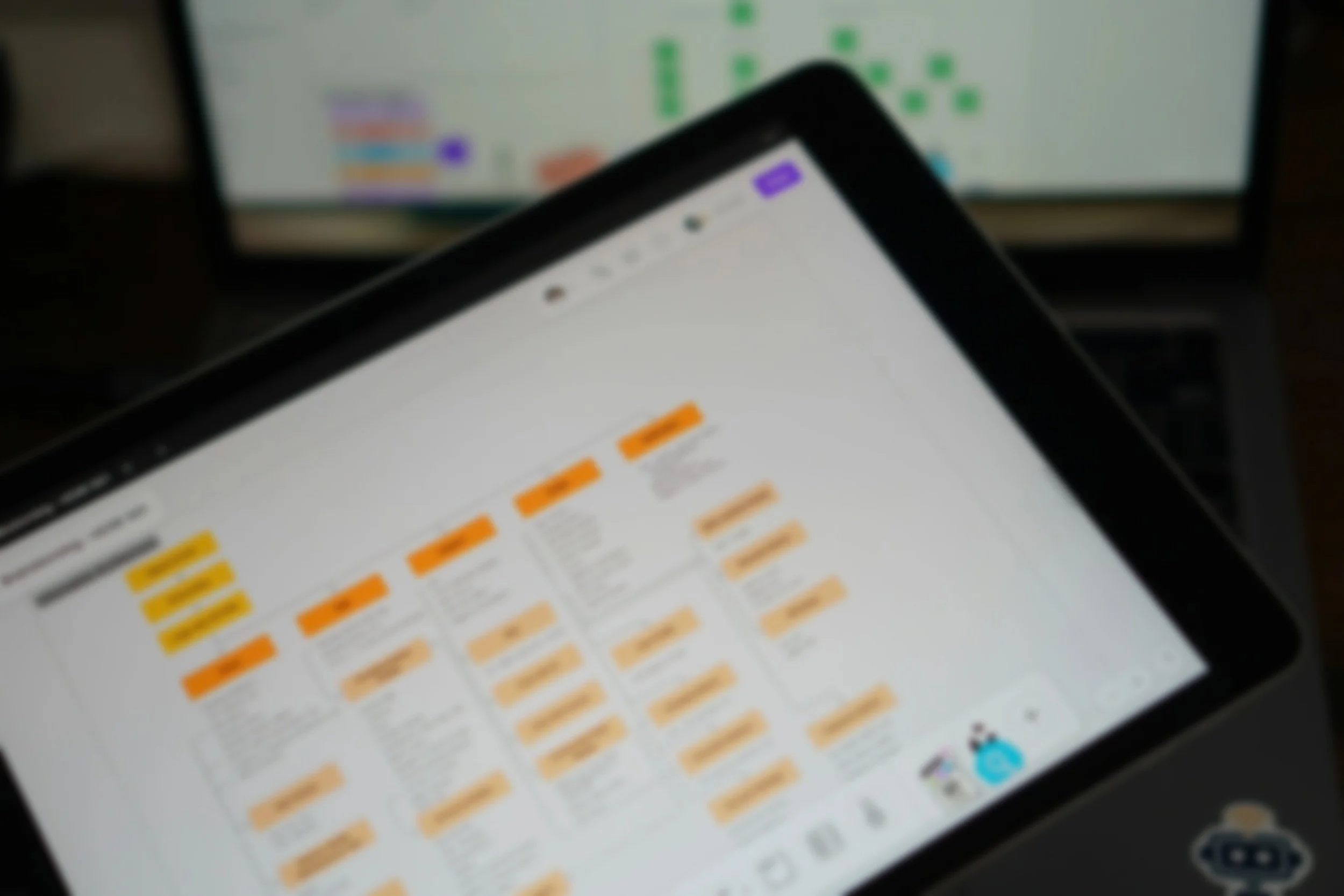
Before redesigning the interface, we mapped the information architecture across all forms. This gave the team a shared view of where filters overlapped, conflicted, or were missing entirely.
“
Strategy & Approach
Based on our findings, we focused on two priorities.
Design a dynamic, flexible, and scalable filtering
Design a filtering system that supports all user groups and can grow as business needs evolve.Data reliability and labeling consistency
Clean up inconsistent labeling and backend data structure. Without this foundation, any UI improvement would fail.
Rollout Phase:
Instead of rebuilding all 100+ form types at once, we rolled out the system in groups of 10 forms. This kept backend updates manageable and allowed the UX team to map and validate each group before release. The phased approach reduced risk and maintained quality throughout the transition.
Scope Decision:
A supervisor distribution feature was highly requested, but we scoped it out to keep the project focused and manageable. It remains a viable future phase.
Design Decisions
Collaborative
Problem-Solving
The UX team started with whiteboarding sessions to explore solutions grounded in research. Concepts were shared with Product Managers and developers to evaluate technical feasibility. The complexity of the forms and performance requirements influenced not only what we designed but also how the backend had to be structured to support it.
Mapping
Complexity
To bridge design intent and technical execution, we created detailed information architecture maps for each form type. These maps visualized the dynamic filtering logic and showed developers exactly which filter options should appear based on user selections.
Design System Considerations
When exploring UI patterns, we initially considered toggle switches for their clean appearance. However, after evaluation, toggles didn’t fit our design system guidelines because they imply instant feedback, whereas our filtering required a deliberate “apply” action.
We proposed chip filtering as the right pattern. Since this component didn’t exist in the design system, we documented it fully and contributed it as a new reusable component. This kept us aligned with the design system while expanding it thoughtfully.
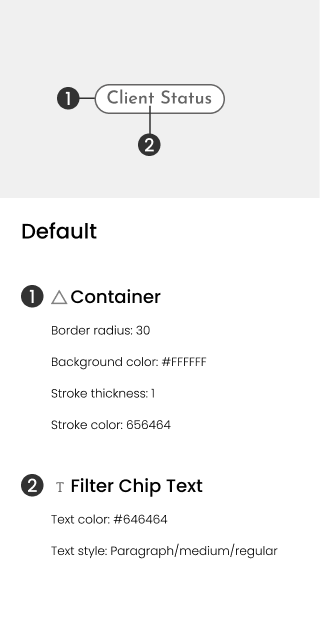
Filter Chip
Spec sample
Core Improvements:
1. Flexible Filtering Architecture
Replaced rigid cascading dropdowns with a scalable filter panel built around a 3-tier structure to support every user workflow:
Tier 1: Auto-populated location filters and required form/task type filtering
Tier 2: Expanded filter options based on tier 1 selections
Tier 3: Additional specific work queue filters
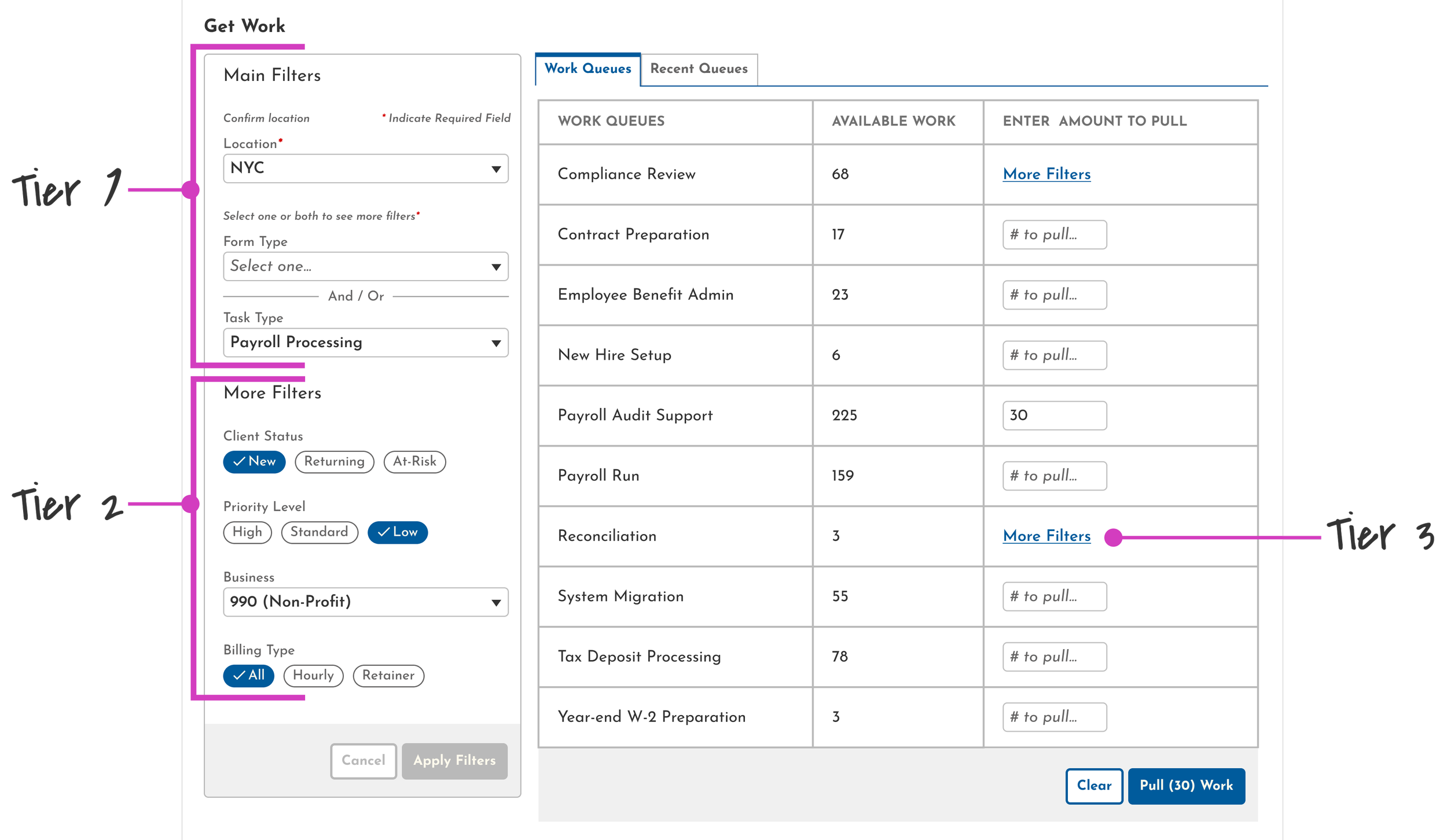
This structure was driven by both user needs and backend performance, ensuring fast data loading across 100+ form types without sacrificing flexibility.
2. Interaction Design
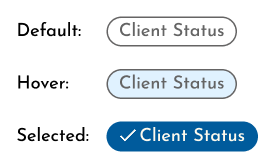
Chip filtering was introduced as the primary selection pattern, allowing users to see all options at once without navigating dropdowns
Applied where 2–3 options exist, reducing clicks and improving scannability
A new component that is fully documented and contributed to the design system for reuse across the platform
3. Backend Architecture Cleanup
Standardized labeling to eliminate inconsistencies
Resolving it at the source made the entire filtering experience more trustworthy and reliable
Validation
Pre-Launch
Conducted remote usability testing with real users on a working prototype.
Formal design review to check component standards, content, and 508 compliance.
Legal review of data labeling before launch
Post-Launch
Set up behavioral tracking through New Relic, collaborating closely with developers to configure and troubleshoot the new tool.
Added custom trackable labels to measure time on task.
Conducted a pulse survey after rollout. Key findings:
Users responded positively to the cleaner, more readable UI.
Users with previously unsupported workflows no longer needed workarounds and felt included for the first time.
A small subset showed initial hesitancy around data accuracy, which we determined was habitual skepticism from the old system, not an ongoing data issue.
Impact & Results:
eXperience
Improvement
Increased flexibility
Users now have full control over filtering, with a dynamic system that supports every workflow type.
Improved efficiency
Time on task decreased by roughly 8 seconds per filter interaction, a small per-task gain that compounds across thousands of daily users.
Enhanced trust
Consistent data labeling and standardized architecture restored confidence in filtered results. Initial post-launch hesitancy was behavioral, not systemic
Business
Benefits
Scalable solution
The new architecture accommodates new form and task types without structural overhaul
Technical efficiency
The 3-tier filtering structure enables faster, more accurate task retrieval with improved backend performance
Inclusion
Two previously unsupported user groups gained reliable access to their work, eliminating the workarounds they had built around the old system
Reduced waste
Support tickets decreased, addressing the 12% unworkable task rate that had been affecting operations
Design system contribution
Chip filtering was introduced as a new reusable component, available for adoption across the platform beyond Get Work
Measurement was directional as SQL tracking was not fully 1:1, but consistently indicated faster task retrieval across users.

Key Learnings
Cross-functional collaboration
Sharing research findings early with developers, product managers, and stakeholders meant design decisions were grounded in both user needs and technical reality from the start. Alignment wasn't an afterthought; it was built into the process.
Design system evolution
Sometimes the best solution requires expanding the system you’re working within. Chip filtering was the right pattern for this project. Fully documenting it as a reusable component strengthened the design language across the platform, not just for Get Work.
Phased delivery
Rolling out 10 forms at a time across 100+ form types wasn't just a scope decision; it was a quality strategy. It gave the team space to map, validate, and refine at each stage rather than risking a single large release.
Closing the loop
Shipping the redesign was only the beginning. Setting up behavioral tracking through New Relic, adding custom SQL labels to measure time on task, and running post-launch pulse surveys ensured we could evaluate the work against real usage, not assumptions. Measuring impact is part of the design process.
Having a great team for this project made it all the more engaging. Great minds, great people, lots of laughter in the midst of this super complex project….what else can a person ask for?! 🥹💖